

Microsoft Copilot
Overview
Microsoft Copilot is Microsoft’s AI assistant, sold as a free chat app and as an add-on inside Word, Excel, PowerPoint, Outlook and Teams. It’s aimed at people who already use Microsoft 365 and want AI in those apps, and at businesses that want AI grounded in company files. The name covers several different products, so sorting out which one you mean comes first.
What Microsoft Copilot is used for
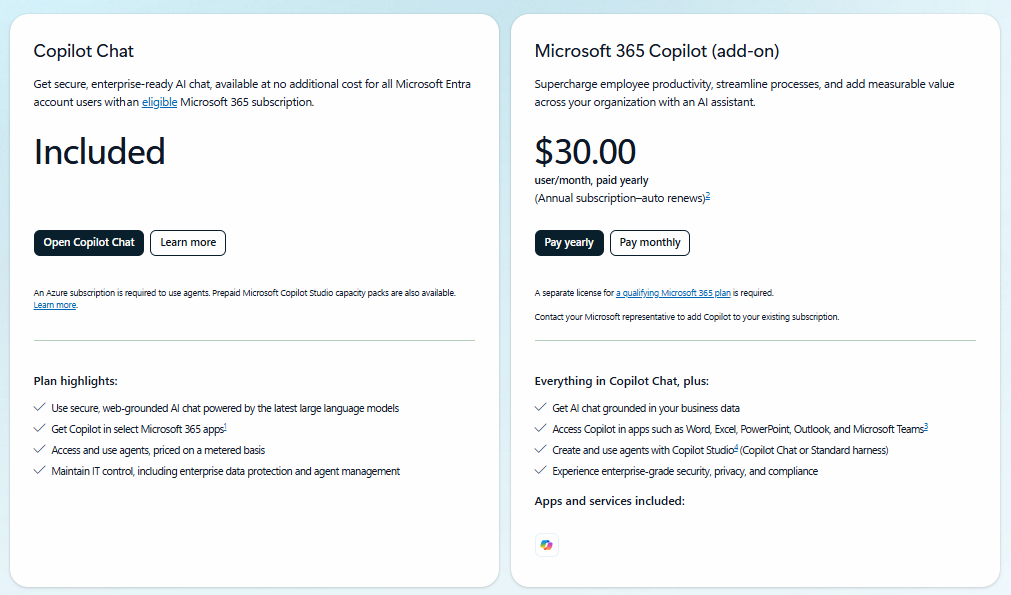
There are really three Copilots. The free one is a chat app at copilot.microsoft.com for questions, brainstorming, image creation and voice. The second lives inside Microsoft 365 apps if you pay for Personal, Family, Premium or Pro. The third is Microsoft 365 Copilot for work, which reads your organization’s email, files and meetings.
The in-app version is where most of the day-to-day value sits. A typical use: summarize a long Outlook thread before a meeting, then ask Copilot in Word to turn the notes into a draft, then have PowerPoint build slides from that draft. In Excel, people ask it to explain a formula or spot trends in a table.
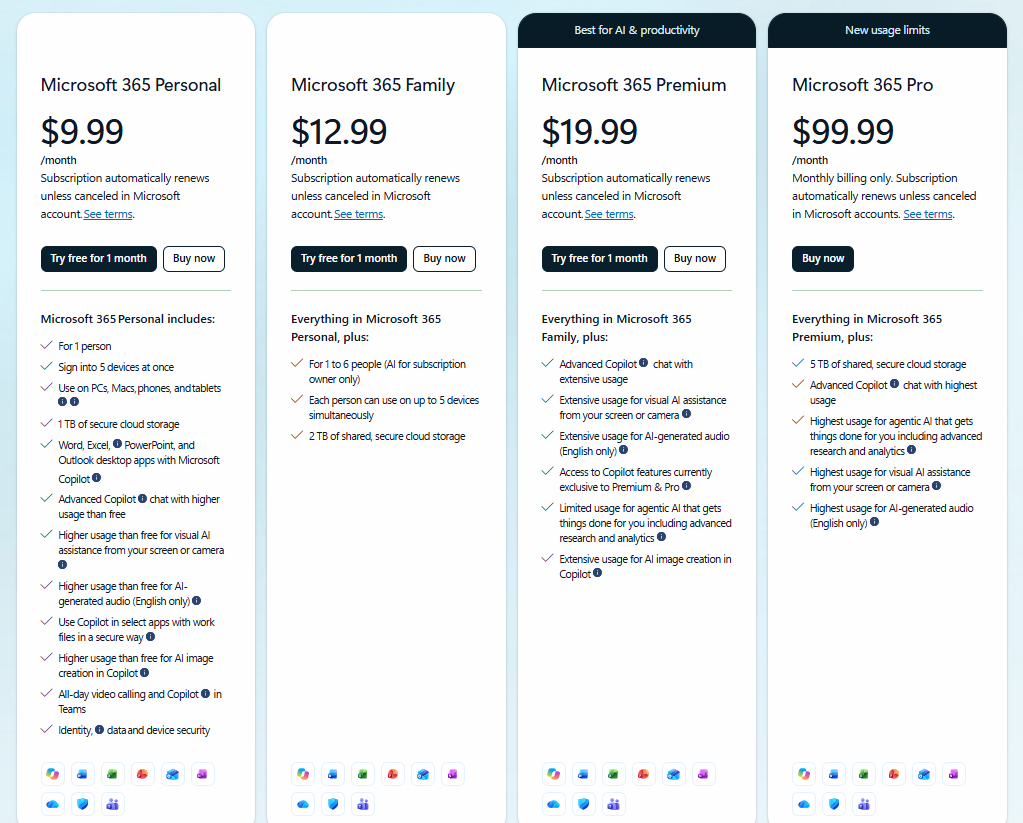
At work, Microsoft says access to company content still follows your organization’s permissions, so you only see what you’re already allowed to open. That’s the main reason IT teams pick it over a general chatbot. For individuals, one detail trips people up: on Microsoft 365 Family, the Office apps are shared with up to five other people, but Copilot features work only for the subscription owner.
Who it’s best for / who should skip it
Best for: Microsoft 365 users who want AI in Word, Excel and Outlook, and organizations that need AI tied to existing file permissions.
Skip it if: you mostly live in Google apps, you want AI features shared across a family plan, or you’d rather use one standalone chatbot than several Copilot products.
Alternatives
- ChatGPT: a standalone assistant from OpenAI, with no dependence on Microsoft 365.
- Google Gemini: Google’s assistant, built into Gmail and Docs instead of Office.
- Claude: Anthropic’s assistant, aimed at writing and long documents, without Office app integration.
FAQs
Is Microsoft Copilot free?
Yes, in a limited form. The Copilot app is free with a Microsoft account, subject to capacity and limits. Features inside Word, Excel and PowerPoint need an eligible Microsoft 365 subscription.
Who owns Microsoft Copilot?
Microsoft does. It began as Bing Chat in February 2023 and was renamed Copilot later that year. Microsoft says Copilot draws on AI models it selects, which began with OpenAI’s GPT-4.
Is Microsoft Copilot safe?
Microsoft says Copilot is built on its existing security, privacy and compliance commitments, and that work access follows your organization’s permissions. Still, check outputs before using them in important documents, and read Microsoft’s privacy page for how your data is handled.
What happened to Copilot Pro?
Outside sources report that Microsoft stopped selling Copilot Pro in late 2025 and replaced it with Microsoft 365 Premium. Microsoft 365 Pro is now the top individual tier.
Can my family use Copilot on a Family plan?
Family benefits like apps and storage can be shared with up to five people. Copilot features in the Office apps are for the subscription owner only. Other members need their own eligible subscription.
What’s the difference between Copilot and Microsoft 365 Copilot?
The first usually means the free consumer chat. Microsoft 365 Copilot is the paid work version that connects to your organization’s emails, files and meetings.
Key Features
- Copilot app and web chat
- Copilot in Word, Excel, PowerPoint and Outlook
- Higher usage tiers
- Agentic AI
- Microsoft 365 Copilot Chat
- Microsoft 365 Copilot (work)
- Copilot Studio
- Mobile app
Pros & Cons
What We Like
- A free tier exists, so you can try Copilot without a Microsoft 365 subscription.
- It works inside Word, Excel, PowerPoint and Outlook, where many people already spend their day.
- At work, access to company files follows existing permissions, which suits IT reviews.
- Premium bundles the Office apps, storage and AI limits into one price.
- A mobile app is available alongside the web and desktop versions.
- Microsoft offers a one-month trial on Personal, Family and Premium.
Things to Consider
- Family plans don't share Copilot. Only the subscription owner gets it, so a household of five needs five eligible subscriptions.
- The naming is confusing. Free Copilot, Copilot Chat and Microsoft 365 Copilot are different products with different data access, and reporters have written about the brand confusion.
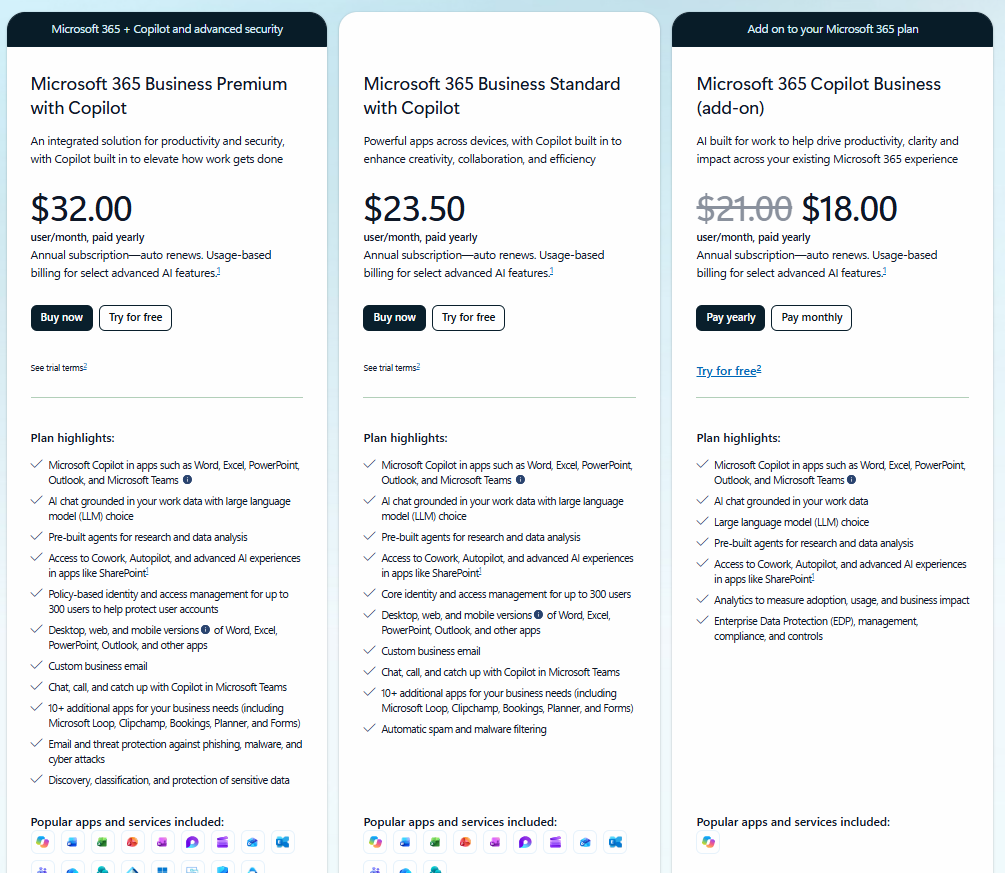
- Business pricing stacks. The $30 work add-on comes on top of a qualifying Microsoft 365 license, so a seat can cost far more than the headline price.
- User satisfaction is mixed. A 2024 Business Insider report said one of the top customer complaints was that Copilot didn't match ChatGPT, and a survey reported by the Wall Street Journal found fewer paying subscribers naming Copilot as their first choice between July 2025 and January 2026.
- Individual plans have usage limits and AI credits, and a feature can go unavailable until your allowance resets.
Pricing
Alternatives
Looking for alternatives? Explore other software tools in this category on Techtoric.
Frequently Asked Questions
No FAQs have been added for this tool yet.