

Hugging Face
Overview
Hugging Face is an AI development platform where developers, researchers, and businesses can discover machine learning models, access datasets, build interactive AI applications, and deploy models. Its central resource, the Hugging Face Hub, combines model and dataset repositories with collaboration tools, making it useful for projects ranging from natural language processing to image generation and speech recognition.
What is Hugging Face used for?
The Hugging Face AI platform helps people find, evaluate, share, and run machine learning models without having to build every component from scratch. Its Hub works somewhat like a code repository tailored to AI: each model or dataset can have its own page, files, version history, documentation, and community discussion.
For example, a developer building a customer-support chatbot can search for a text-generation model, review its model card and licence, test it through an available inference widget, and then integrate it into an application. A researcher working on sentiment analysis can find a labelled dataset, download it, and use compatible libraries to train or evaluate a model.
The platform also supports computer vision, audio processing, image generation, and other machine learning tasks. With Spaces, developers can publish interactive demonstrations, including Gradio applications and projects built with Docker. This makes it possible to share a working AI prototype through a web page instead of asking every reviewer to install the software locally.
For teams moving beyond experiments, Hugging Face provides hosted inference options, dedicated deployment infrastructure, private repositories, and collaboration controls. However, using a model from the Hub doesn’t automatically make it free to run in production. Compute, API usage, storage, licence restrictions, and deployment requirements can all affect the total cost.
Who is Hugging Face best for?
Best for:
- AI and machine learning developers exploring pretrained models.
- Researchers searching for datasets and reproducible experiments.
- Startups building AI prototypes before investing in dedicated infrastructure.
- Educators teaching machine learning through model demonstrations.
- Businesses evaluating open models for potential internal or customer-facing applications.
Who should skip it?
Someone who simply wants a straightforward AI chat assistant for writing emails or summarising everyday documents may find a consumer assistant easier to use. Hugging Face is primarily a development and discovery ecosystem, not a single, ready-made productivity chatbot.
Hugging Face alternatives
- Replicate – Focuses on running and integrating models through hosted APIs, often with a simpler model-execution workflow.
- Kaggle – Particularly useful for datasets, notebooks, machine learning competitions, and data-science practice.
- GitHub – Better suited to general-purpose source-code collaboration; Hugging Face adds AI-specific model and dataset discovery features.
- Google Colab – Useful for running Python notebooks in a hosted environment, rather than serving as a dedicated model-and-dataset hub.
FAQs
Is Hugging Face free?
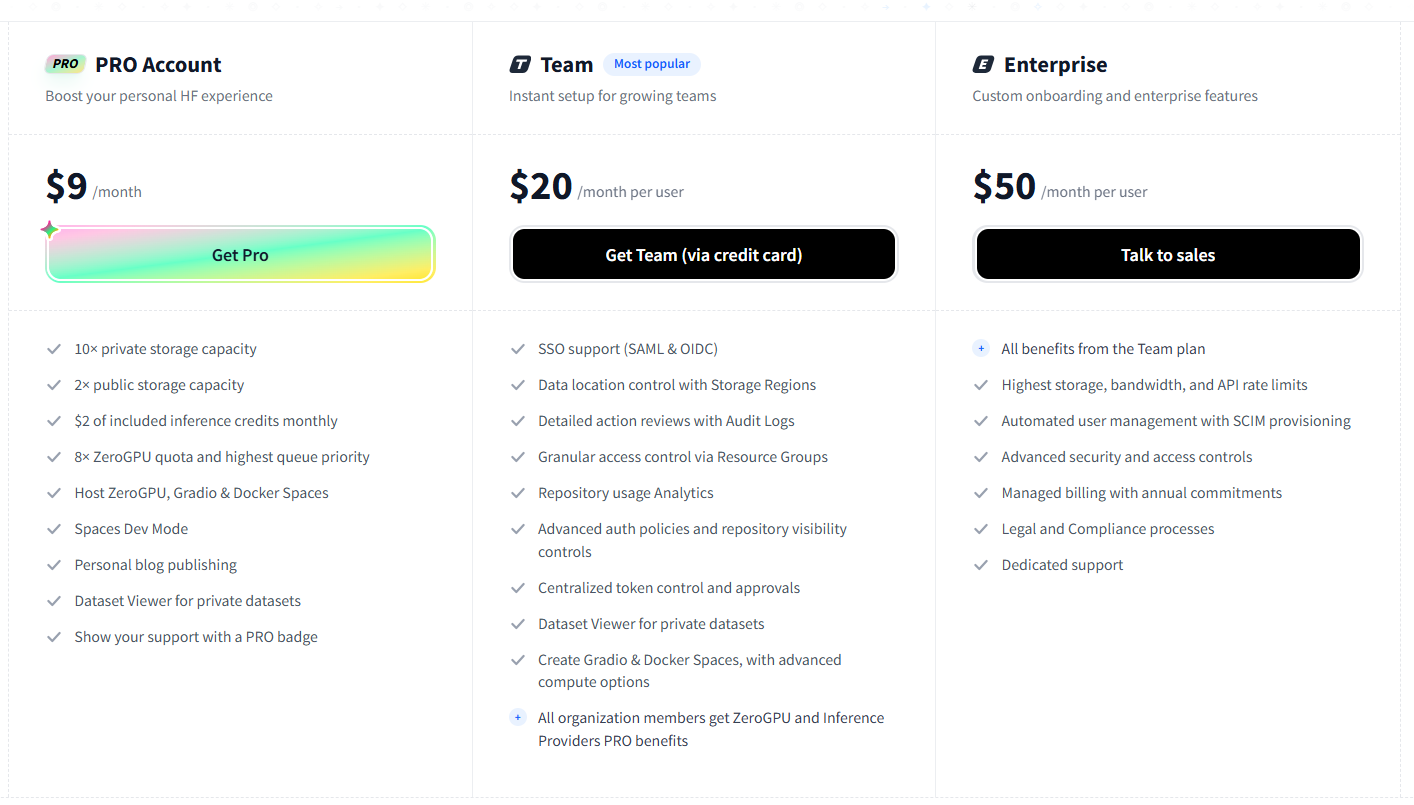
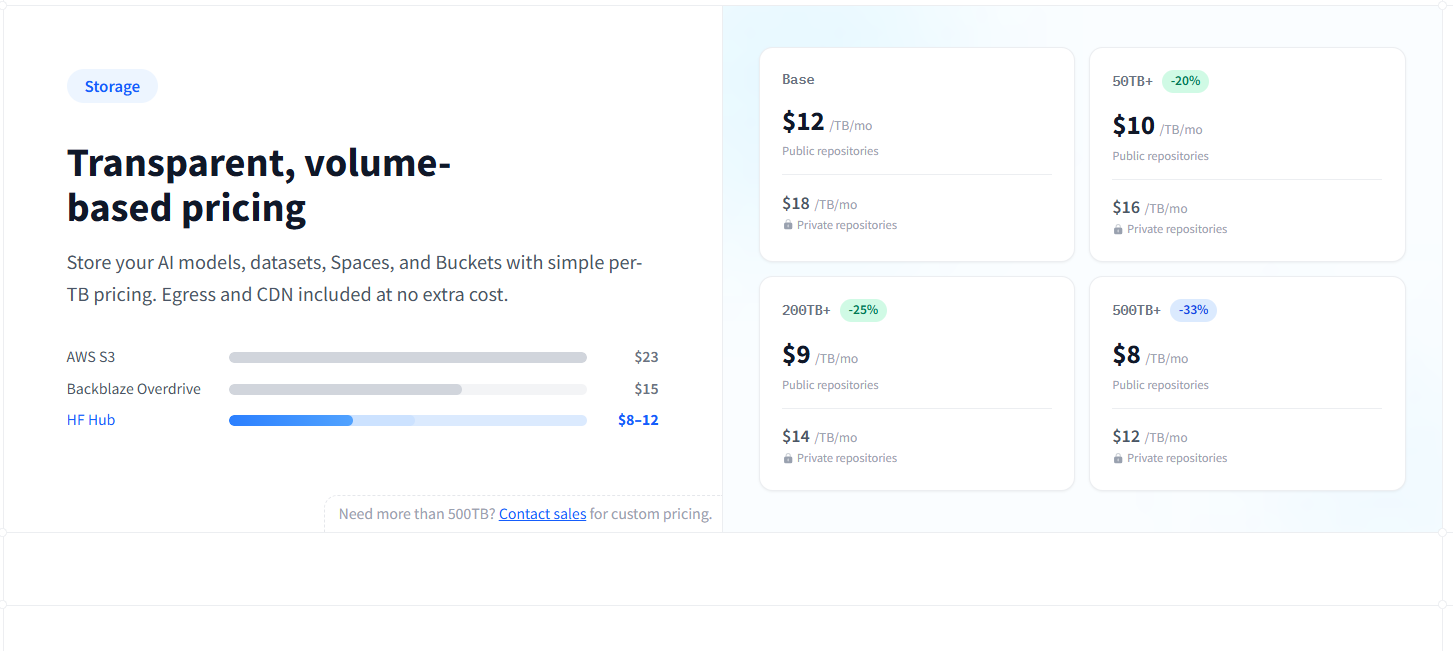
Yes. You can create a free account and access public repositories, community resources, and selected free-tier features. Paid subscriptions, additional storage, hosted inference, and upgraded compute may incur charges.
Who owns Hugging Face?
Hugging Face is a company founded by Clément Delangue, Julien Chaumond, and Thomas Wolf in 2016. It operates the Hugging Face Hub and a wider ecosystem of machine learning tools.
Is Hugging Face open source?
Hugging Face hosts many open-source libraries, publicly available models, and datasets, but not every resource on the platform has the same licence. Check the licence attached to each repository before modifying, redistributing, or commercially using its contents.
Can beginners use Hugging Face?
Yes, especially for browsing models, trying interactive demos, and exploring datasets. Building and deploying a custom model usually requires additional knowledge of programming, machine learning, or hosted inference.
Can I use Hugging Face models in a commercial product?
Potentially, but permission depends on the individual model’s licence and any applicable terms. Check the model card, licence, and any restrictions before using a model in a commercial application.
Does Hugging Face host AI applications?
Yes. Hugging Face Spaces lets users publish interactive machine learning demos and applications, with support for Gradio, Docker, and static web projects. Resource-intensive applications may require paid hardware.
Hugging Face is a strong choice for developers and researchers who need access to AI models, datasets, and practical deployment tools in one ecosystem. Its main advantage is flexibility, but users must evaluate model licences, quality, hardware requirements, and running costs rather than assuming every resource is production-ready or free.
Key Features
- Model Hub: Search and compare models for language, vision, audio, and other machine learning tasks. Individual model pages can include licences, evaluation information, usage instructions, and known limitations.
- Dataset repository: Discover, inspect, download, and share datasets for training and evaluating AI systems. Dataset viewers can help users examine supported datasets before integrating them into a workflow.
- Spaces for AI demos: Publish browser-accessible AI applications using supported frameworks such as Gradio, Docker, or static HTML. Paid compute upgrades are available for projects that need more resources.
- Transformers and related libraries: Use established open-source libraries to load and work with pretrained models rather than implementing every model architecture from scratch.
- Inference Providers: Access supported models through a unified interface, test models in interactive playgrounds, and integrate inference into Python or JavaScript applications. Usage can incur charges.
- Model versioning and collaboration: Use Git-based repositories, commit histories, branches, and diffs to track changes to AI project files and collaborate with other contributors.
- Private repositories and team controls: Keep selected models, datasets, and project files private, with more advanced access management, audit logs, and organisational controls on paid plans.
- Dedicated inference infrastructure: Deploy supported models on managed endpoints with configurable hardware and scaling options when a shared or serverless setup isn't suitable.
Pros & Cons
What We Like
- Broad model selection: Developers can explore different models and approaches without sourcing each project independently.
- Useful model documentation: Model cards and repository information can help users assess intended use, licensing, and limitations before implementation.
- Practical prototyping: Spaces makes it easier to demonstrate an AI application to colleagues, customers, or research collaborators.
- Open-source development ecosystem: Libraries and repository workflows support experimentation, customisation, and integration into existing codebases.
- Multiple deployment paths: Users can progress from interactive experiments to hosted inference or dedicated infrastructure as their requirements grow.
Things to Consider
- The learning curve can be steep: Users unfamiliar with Python, model formats, inference, or GPU requirements may find the platform difficult to navigate.
- Compute costs can grow: Hosting a large model or handling substantial inference traffic may cost considerably more than browsing public repositories.
- Model quality varies: Models differ in accuracy, speed, language support, licensing, and maintenance. The platform itself doesn't guarantee that every model is appropriate for a particular task.
- Licences require attention: Publicly accessible model weights aren't automatically unrestricted for commercial use.
- Self-service resources have limits: Free compute and shared infrastructure aren't a substitute for guaranteed production capacity.
Pricing
Alternatives
Looking for alternatives? Explore other software tools in this category on Techtoric.
Frequently Asked Questions
No FAQs have been added for this tool yet.