

Google Gemini
Overview
Google Gemini is an AI assistant developed by Google that helps users research questions, write and edit content, understand documents, generate images, and solve problems. It’s particularly useful for people who already use Google services, since eligible subscriptions connect Gemini with applications such as Gmail, Google Docs, and Sheets.
Quick facts
| Field | Details |
| Developer/company | Google LLC, part of Alphabet |
| Founders/inventors | Google was founded by Larry Page and Sergey Brin; Gemini was developed by Google DeepMind and other Google teams |
| Initial release | February 2024 under the Gemini app and brand; its predecessor, Bard, launched in 2023 |
| Category | AI Assistant, AI Writing, Research, Productivity |
| Platforms | Web, Android, iOS, and supported Google applications; developer access through APIs |
| Pricing model | Free access, paid subscriptions, and API usage-based billing |
| Official website | gemini.google.com |
| Sign-up | Open Gemini |
| Documentation | Gemini developer documentation |
| Company address | Google LLC, 1600 Amphitheatre Parkway, Mountain View, CA 94043, USA |
| Official contact | Google contact page |
Google renamed Bard to Gemini on February 8, 2024, and introduced the Gemini mobile app alongside its paid Gemini Advanced experience. Google had introduced the Gemini model family in December 2023, so the model announcement and consumer app release are separate milestones.
What is Google Gemini used for?
Google Gemini helps users turn questions, documents, and rough ideas into useful working material. A student can ask it to explain a difficult concept in simpler language, a content writer can use it to develop an article outline, and a developer can ask it to explain a code snippet or investigate an error. The quality of the result depends on the prompt, the available model, and the information supplied.
Gemini is especially relevant to people working inside Google’s ecosystem. With an eligible subscription and supported account, users can access AI assistance in applications such as Gmail and Google Docs. A marketer might draft a campaign email in Gmail, refine a proposal in Docs, and analyse a spreadsheet in Sheets without moving between several unrelated services. Feature availability varies by plan, country, and account type.
The assistant can also work with supported files and images, help users explore ideas, and generate visual content. Developers can use the Gemini API through Google AI Studio or Google Cloud’s Vertex AI to integrate models into applications.
It isn’t a replacement for fact-checking. Gemini can misunderstand a document, invent details, or provide outdated information. For published content, technical decisions, or research that requires evidence, check the original sources rather than treating the generated response as authoritative.
Who is Google Gemini best for?
Best for: Students, writers, marketers, developers, researchers, and professionals who want a general-purpose assistant with Google app integration.
Who should skip it? Users who mainly need a dedicated AI image generator, a specialised search engine with source-first answers, or a locally hosted model with greater control over deployment may prefer another tool.
FAQs
Is Google Gemini free?
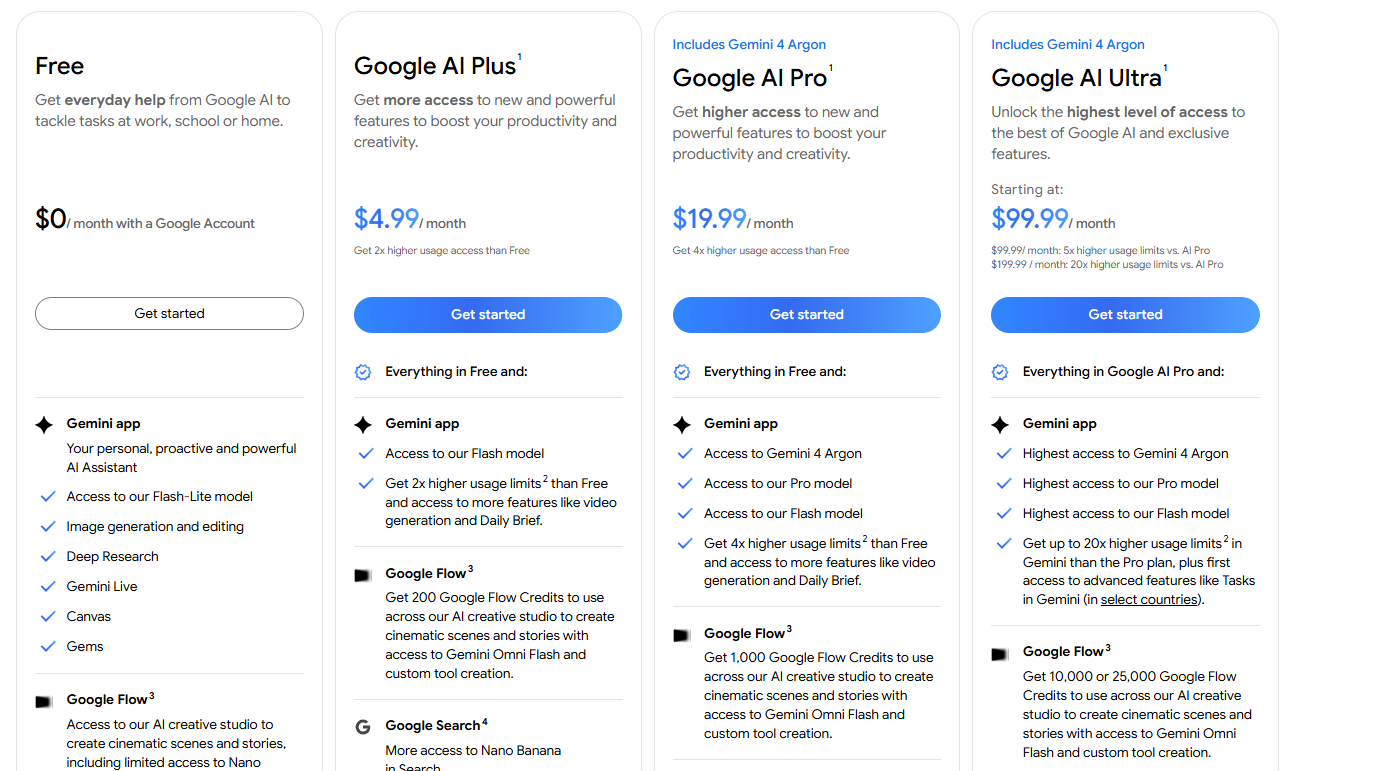
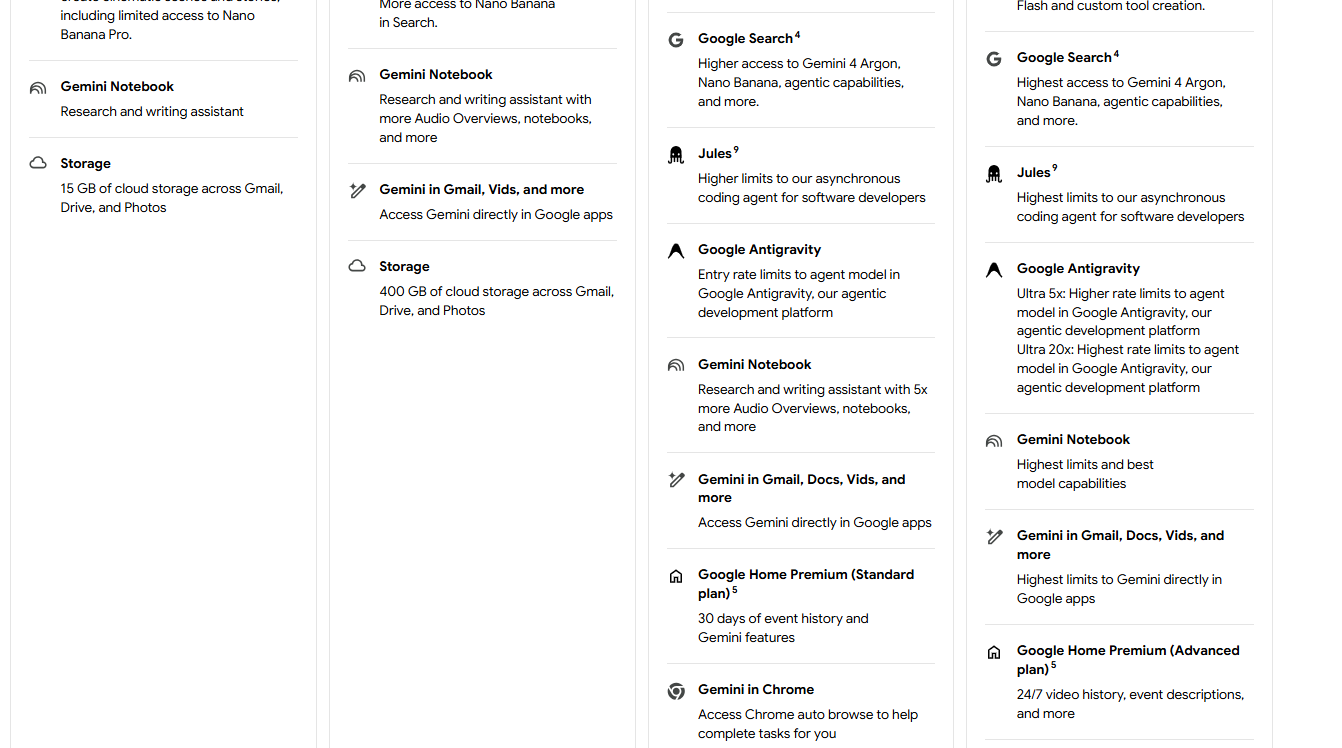
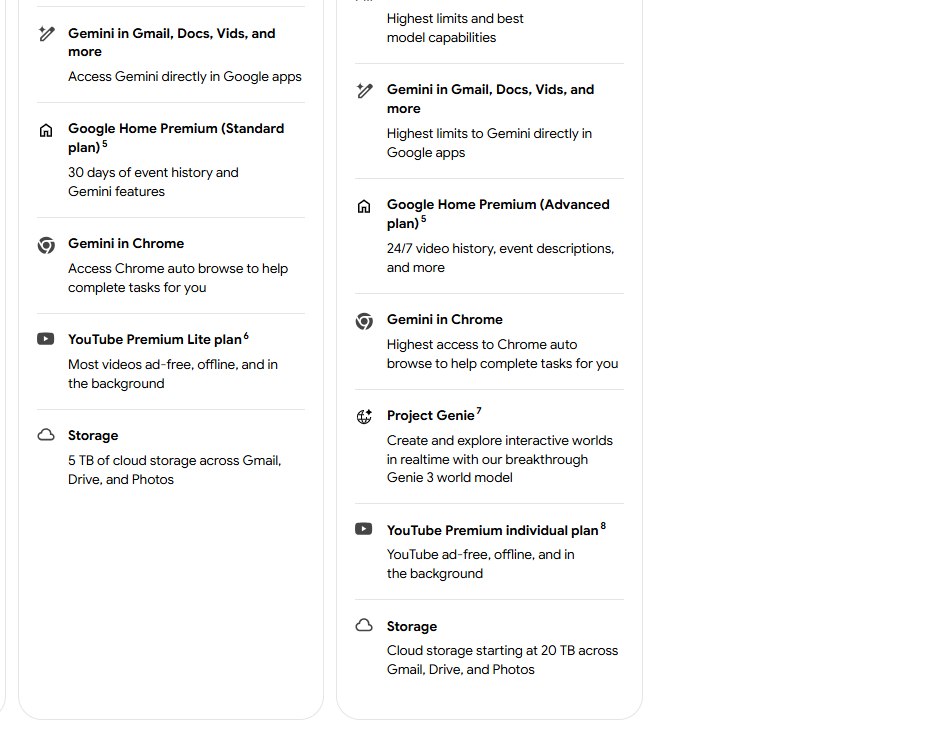
Yes. Google offers free access to Gemini, with limits on model availability and usage. Google AI subscriptions provide expanded access and additional benefits.
Who owns Google Gemini?
Google develops Gemini through Google DeepMind and other Google teams. Google is part of Alphabet Inc.
Can Gemini write blog posts?
Yes. It can help with outlines, drafts, revisions, and research planning. Writers should verify factual claims, add original analysis, and edit the result before publication.
Is Gemini available on mobile?
Yes. Gemini is available through supported Android and iOS experiences, although the precise app and feature availability varies by device, account, and region.
Can Gemini analyse files?
Yes, it can analyse supported file types and images, subject to current feature limits. Check calculations, extracted details, and conclusions against the original material.
Can developers use Gemini through an API?
Yes. Developers can access supported Gemini models through the Gemini API, with usage-based pricing and model-specific limits.
Google Gemini is a sensible general-purpose AI assistant, particularly for people already using Google’s productivity tools. Its main advantage is the combination of conversational assistance and Google ecosystem integration, but accuracy, usage limits, and regional availability still need attention.
Key Features
- Conversational AI: Ask questions, request explanations, and refine an answer through follow-up prompts.
- Writing assistance: Draft emails, rewrite paragraphs, summarise text, and develop content outlines.
- File and image understanding: Analyse supported uploads and use visual information as context for questions.
- Google Workspace integration: Eligible plans provide Gemini assistance in supported Google applications, including Gmail, Docs, and Sheets.
- Research tools: Supported Deep Research features can gather information across sources and prepare longer reports.
- Image and media generation: Generate images and access supported creative tools; availability and limits depend on the plan.
- Developer API: Integrate Gemini models into software using Google's developer tools and supported API endpoints.
- Multimodal models: Supported models can process combinations of text, images, audio, video, and other inputs.
Pros & Cons
What We Like
- Useful for everyday work: Handles drafting, explanations, brainstorming, and document-based questions.
- Google integration: Particularly convenient for users who spend much of their working day in Gmail, Docs, and Sheets.
- Multimodal input: Supported models can interpret more than plain text.
- Developer access: The API provides a route for integrating Gemini into custom applications.
- Free entry point: Users can try the assistant without committing to a paid subscription.
Things to Consider
- Incorrect answers remain possible: Confident responses aren't proof of accuracy.
- Plan restrictions can be confusing: Model access and usage allowances differ between free and paid subscriptions.
- Some integrations are region-dependent: Not every feature is available in every country or account type.
- Generated content needs editing: Writing can sound generic without specific context and careful revision.
- Subscription value depends on existing tools: People who don't use Google services may not benefit as much from the bundled features.
Pricing
Alternatives
Looking for alternatives? Explore other software tools in this category on Techtoric.
Frequently Asked Questions
No FAQs have been added for this tool yet.