

Claude
Overview
Claude is an AI assistant from Anthropic. You can chat with it on the web, desktop and mobile, or build it into your own software through an API. People mostly use it to draft and edit text, work through long documents and write code.
What Claude is used for
Writing is where most people start. You paste in a draft, a pile of notes or a long report, then ask Claude to tighten it, summarize it or rewrite it for a different reader. One Capterra reviewer says they’ve used it for five months, mainly for research and summarizing long documents.
Developers are the second big group. Claude Code works on a codebase from the terminal or desktop app instead of a chat window. It’s included from the Pro plan up, and its usage draws from the same pool as your chats.
Then there’s the organizing side. Projects keep chats and files together by topic. Artifacts turn a request into a working page or small app next to the conversation. A freelancer could keep one project per client with a style note and past samples attached, and a student could use the free plan to draft study questions from lecture notes. Paid plans add Research mode, Claude in Chrome and Microsoft 365 integration.
Who should use Claude?
Claude is a good fit for:
- Content writers and SEO professionals who need help with outlines, content briefs, editing, research and large batches of text.
- Developers and technical teams who want assistance with debugging, code generation, code review and more involved programming tasks.
- Students and researchers who need help organizing notes, summarizing reading material and understanding complex subjects.
- Small businesses and teams that want to introduce AI assistance into documentation, research or internal workflows.
- Power users who regularly work with files, long documents or coding projects and can justify a paid subscription.
Who should skip Claude?
Claude may not be the right choice for someone who needs unlimited free AI usage, expects every answer to be correct without checking it, or requires guaranteed performance on time-sensitive tasks. Businesses handling confidential information should also assess Anthropic’s applicable data-use, retention and contractual terms before uploading sensitive material.
For occasional questions and simple writing tasks, the free plan is a sensible starting point. Users who repeatedly hit its limits can compare the cost of Pro with their actual workload before upgrading.
Alternatives
- ChatGPT: includes image generation, which Claude lacks.
- Google Gemini: built around Google’s apps and search.
- Perplexity: search-first, with sources attached to answers.
Claude is a strong pick for writing, long documents and coding, and reviewers keep saying so. The weak spot is usage caps, which come up in nearly every critical review. Try the free plan on a real task before paying.
FAQs
Is Claude free?
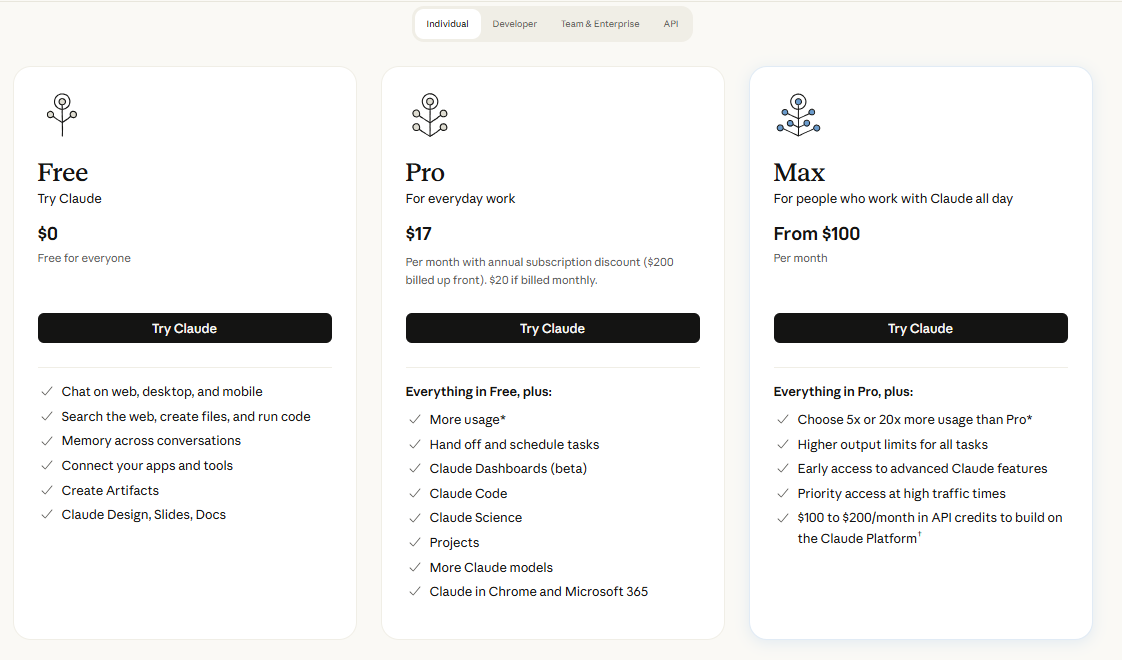
Yes. The free plan covers chat, web search, Artifacts and Projects, but caps usage per five-hour window and excludes Claude Code and Research. Paid plans start at $20 monthly or $17 billed annually.
Who owns Claude?
Anthropic PBC, a San Francisco public benefit corporation founded in 2021 by former OpenAI staff, including siblings Dario and Daniela Amodei. It’s privately held.
Is Claude safe to use?
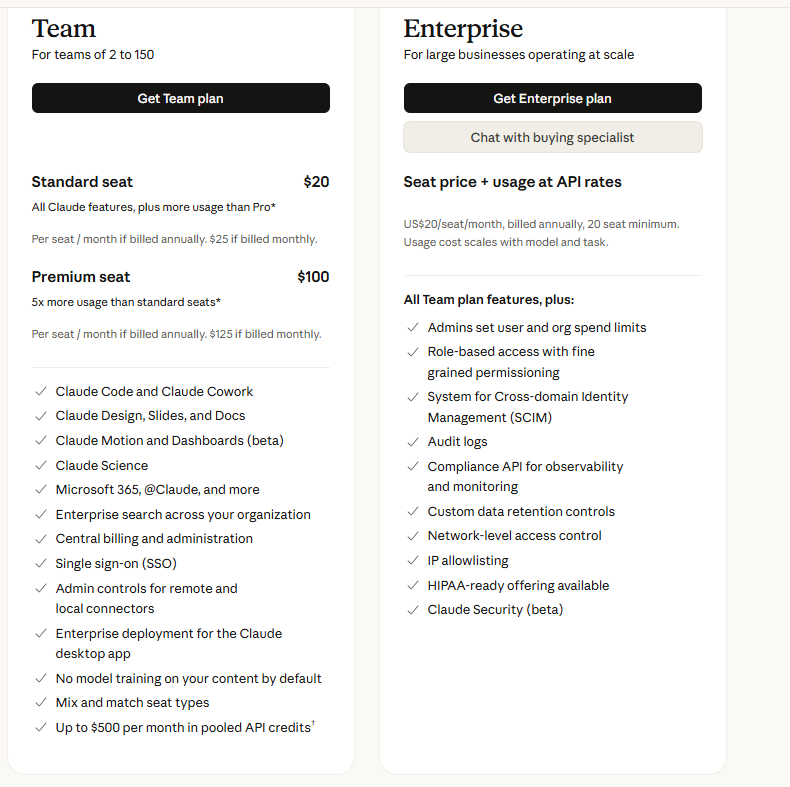
Anthropic’s pricing page lists model training as an opt-out setting on Free, Pro and Max, and off by default on Team and Enterprise. Avoid pasting passwords, IDs or confidential client files, and read the privacy policy before using it for work data.
What’s the difference between Claude Pro and Max?
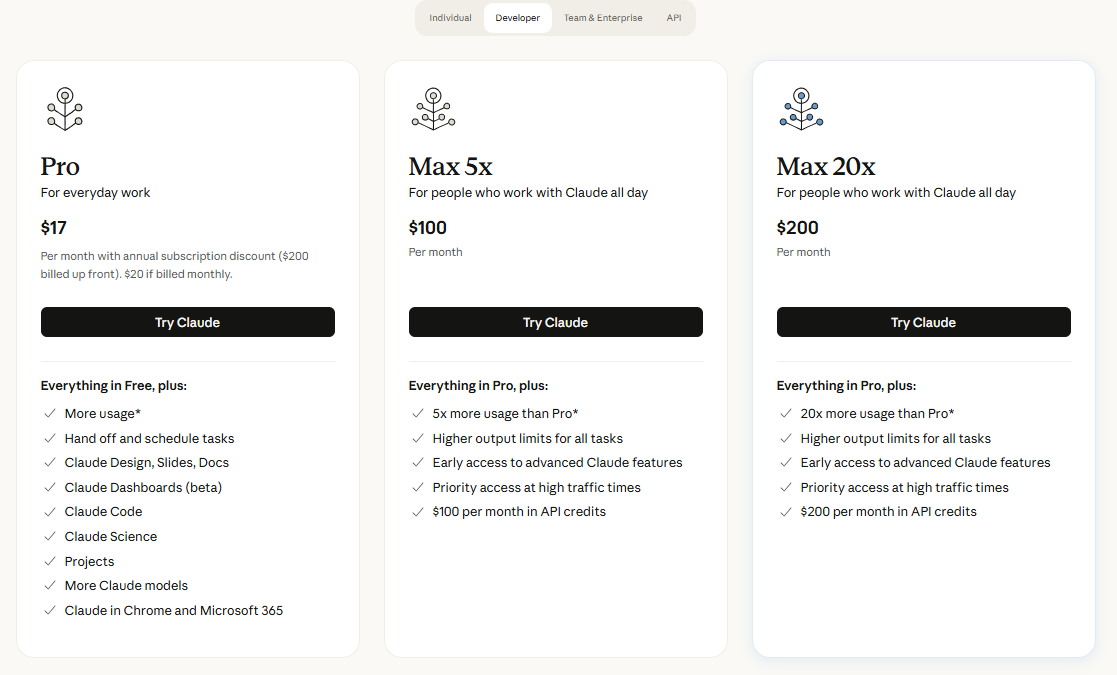
Pro gives at least 5x the Free usage per session. Max gives 5x or 20x Pro’s usage, plus higher output limits, priority access and monthly API credits.
Can Claude generate images?
Independent reviews say it can’t create images natively. It can produce SVG or HTML graphics as code.
Key Features
- Multiple models
- Long context
- Projects
- Artifacts
- Claude Code
- Research
- Connectors, Skills and Memory
- Claude Design, Slides and Docs
Pros & Cons
What We Like
- Reviewers on Capterra repeatedly single out the quality of its writing.
- Handles long documents well, with context windows up to 1M tokens on some models.
- Writing, research, coding and slide-making sit under one subscription.
- Free plan includes web search, Artifacts, Memory and Projects.
- Team and Enterprise plans don’t train on your content by default.
- Max gives heavy users a middle step between $20 and $200.
Things to Consider
- Usage limits are the loudest complaint. Reviewers describe the free plan running out after a handful of prompts, and some paying users call the caps opaque.
- No native image generation, according to multiple independent reviews.
- Free plan excludes Claude Code, Research and Opus.
- Max is monthly only, with no annual discount.
- Users also report occasional outages and degraded service.
Pricing
Alternatives
Looking for alternatives? Explore other software tools in this category on Techtoric.
Frequently Asked Questions
No FAQs have been added for this tool yet.