
BILL
Overview
BILL is cloud software for paying vendor bills and sending customer invoices, built for small and midsize businesses and the accountants who serve them. Bills come in, the right people approve them, and payment goes out by ACH, card, check, or wire. It syncs with QuickBooks and Xero on higher plans.
What BILL is used for
The core job is replacing the paper-and-email bill routine. A vendor emails an invoice to a dedicated address, or you upload a scan. Bill.com reads the invoice, and you confirm the details. It then sends the bill to whoever has to approve it under your rules, and you pay it. The payment can be an ACH transfer, a virtual card, a mailed check, or an international wire. The vendor never sees your bank details.
A typical case is a 15-person services firm where the owner approves everything from a phone, and the bookkeeper works in QuickBooks Online. With a two-way sync, bills entered in Bill.com land in the books without retyping. The same account can send invoices, schedule payment reminders, and set customers up on auto-pay.
Accounting firms use it differently. They manage many client companies from one console and BILL prices that are by client entity rather than by firm staff.
Who is BILL best for, and who should skip it?
It suits small and midsize businesses with a real approval chain, a QuickBooks or Xero ledger and a steady stream of vendor bills. Accounting firms managing many clients also fit well.
Skip it if you pay a handful of bills a month, since the seat price will outweigh the benefit. Also look elsewhere if you need heavy reporting or a bespoke enterprise rollout.
Alternatives
- Melio: Offers free basic bill pay, so it’s cheaper to start with fewer automation features.
- Tipalti: Aimed at larger companies and global payables, with custom pricing.
- Stampli: An AP-focused competitor that regularly appears in head-to-head review comparisons.
- Ramp: Pairs spend management with AP, so it overlaps more with Bill.com’s card side.
Key Features
- Approval workflows
- AI invoice coding
- W-9 collection
- Multiple payment rails
- Accounting sync
- Invoicing
- Procurement
- API access
Pros & Cons
What We Like
- Approval routing and audit trails cover the whole bill lifecycle in one place.
- The Team plan and above sync both ways with QuickBooks and Xero, which reviewers cite often.
- Domestic ACH at $0.59 and free virtual card payments keep common payment costs low.
- Pay-by-card lets you hold cash longer, though 2.9% is a real cost.
- The Spend & Expense product has no per-user software fee.
- Review sites show G2 around 4.4 and Capterra around 4.1, though the counts come from a third-party aggregator
Things to Consider
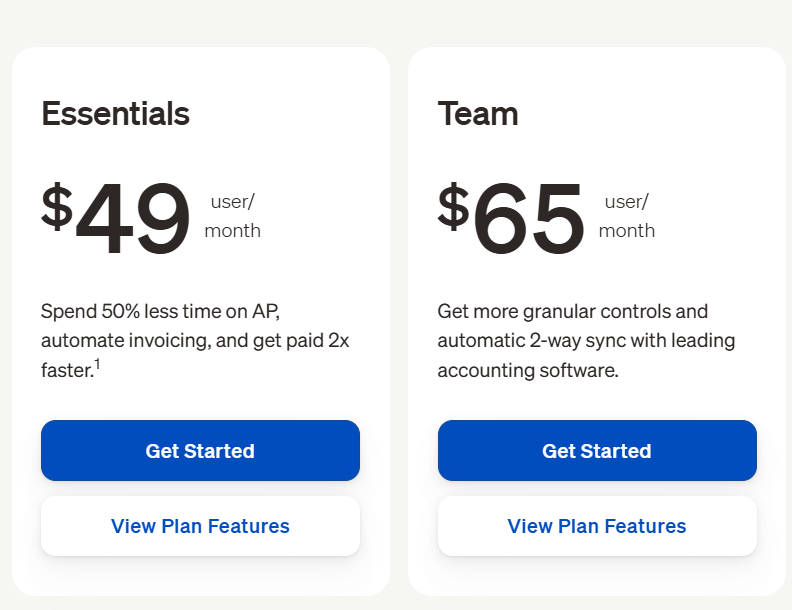
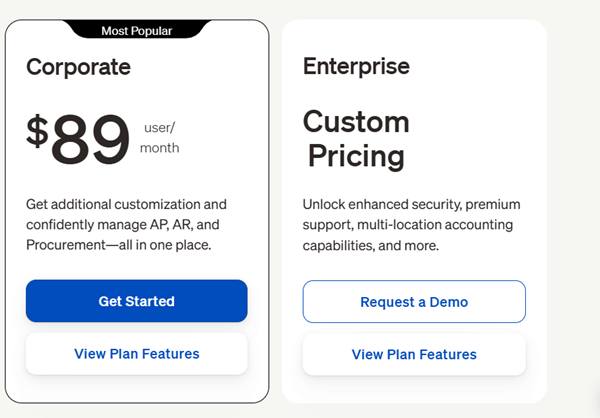
- Per-user pricing adds up. A 10-person team on Essentials pays about $490 a month before any payment fees.
- Essentials has no automatic accounting sync. You import and export CSV files by hand.
- Trustpilot reviewers repeatedly report payment delays, fund holds, and unexpected fees. The Trustpilot score is about 2.1.
- Implementation and training are often sold separately, and reviewers call that a cost surprise.
- Reporting is lighter than analytics-first rivals, and very complex enterprises may outgrow it.
Pricing
Alternatives
Looking for alternatives? Explore other software tools in this category on Techtoric.
Frequently Asked Questions
No FAQs have been added for this tool yet.