
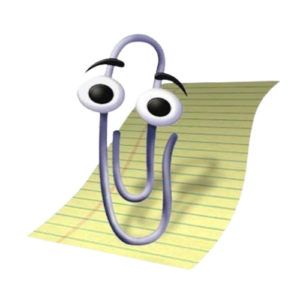
Clippy
Overview
Clippy is the animated paperclip that popped up in Microsoft Office from 1997 to 2003, offering tips while you worked in Word, Excel and PowerPoint. Its official name was Clippit, and Clippy is the nickname that stuck. It’s a fit for anyone curious about software history, and for anyone who wants a retro chat window for local AI models.
What Clippy is used for
In the original Office, Clippy appeared when the software guessed you could use a wizard, a help search, or a tip about a feature. The advice was driven by Bayesian algorithms, which is why it would pipe up the moment you typed something that looked like a letter. That guessing was the whole pitch and also the problem. The tips were basic, and users grew frustrated with an assistant that only offered elementary advice.
Today, people use Clippy in two ways. The first is nostalgia and memes. Captioning screenshots with a fresh “It looks like you’re writing…” line is the typical use. The second is practical, if quirky. Rieseberg’s app wraps a local language model in a Clippy window. It runs offline, supports most GGUF-format models, and offers one-click installs of Google’s Gemma3, Meta’s Llama 3.2, Microsoft’s Phi-4 and Qwen’s Qwen3. You open it, pick a model, and ask your questions. Nothing leaves your machine, apart from an update check you can switch off.
Pros
- Free, and the revival app runs offline
- Easy to try: open the app and chat
- Swap in any GGUF model, including your own
- Editable prompt, so the personality is yours to change
- Open source, with code on GitHub
- Faithful to the original look
Cons
- The original was interruptive, and Microsoft turned it off by default in 2001 before dropping it
- The app is unofficial and, by its own README, not affiliated with or supported by Microsoft
- The creator says it isn’t trying to be your best chatbot, and small default models are limited
- The latest release shown on GitHub when I checked was v0.4.3 from May 2025, with 111 open issues
- No built-in access to your files or Office documents
Who is Clippy best for, and who should skip it?
Best for: people who like retro software, developers who want a small Electron + llama.cpp reference project, and anyone who wants a private, offline chat toy.
Skip it: if you need a serious writing or coding assistant, or you want Clippy back inside Word. This isn’t that.
Clippy Alternatives
- Microsoft Copilot in Microsoft 365: The modern, supported AI helper inside Office, at a subscription price.
- Clippy.js: A JavaScript library for putting Clippy-style characters on a webpage. It’s a developer tool, not a chatbot.
- Ollama or LM Studio: Local model runners with plainer interfaces, aimed at people who want more control than novelty.
FAQs
Is Clippy free?
The Clippy Desktop Assistant is free. The original lived inside paid Office editions and is no longer available.
Who created Clippy?
Microsoft shipped it. The character was designed by Kevan J. Atteberry. He worked with Stanford social psychologists and focus groups before Clippy became the default.
Is Clippy safe?
The original is unsupported software. Security updates for Office 97 ended on January 16, 2004. The revival app’s README says its only network request is an update check, but I haven’t seen an independent security audit.
Why was Clippy removed?
Microsoft stopped enabling it by default in 2001 and it disappeared in 2007. Office XP marketing even had Clippy say the new version made assistants like him unnecessary.
Can I get Clippy back in Word?
I found no official way to re-enable the original assistant. The practical route is the standalone desktop app above, or the emoji in Microsoft 365.
Key Features
- Context-triggered tips (original)
- Character choice (original)
- Voice input (original)
- Local LLM chat (revival)
- Editable personality (revival)
- Custom models and settings (revival)
- Clippy emoji (Microsoft 365)
Pros & Cons
What We Like
- Free, and the revival app runs offline
- Easy to try: open the app and chat
- Swap in any GGUF model, including your own
- Editable prompt, so the personality is yours to change
- Open source, with code on GitHub
- Faithful to the original look
Things to Consider
- The original was interruptive, and Microsoft turned it off by default in 2001 before dropping it
- The app is unofficial and, by its own README, not affiliated with or supported by Microsoft
- The creator says it isn't trying to be your best chatbot, and small default models are limited
- The latest release shown on GitHub when I checked was v0.4.3 from May 2025, with 111 open issues
- No built-in access to your files or Office documents
Alternatives
Looking for alternatives? Explore other software tools in this category on Techtoric.
Frequently Asked Questions
No FAQs have been added for this tool yet.